
In Odoo 18, Kanban views may display an “Add a stage” option that allows users to create new stages directly from the kanban view. If you want to prevent users from creating stages from the Kanban view, you can disable this option using the group_create attribute in the Kanban view definition.
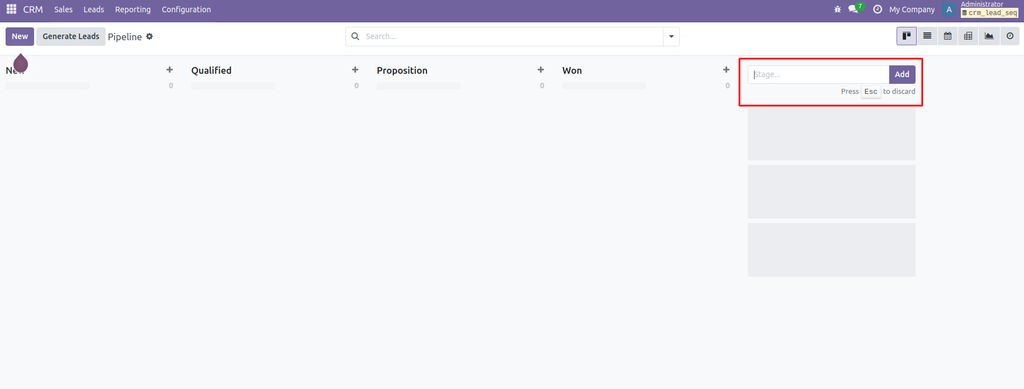
Why Is This Useful?
Hiding the “Add a stage” option can help you:
- Maintain workflow consistency: Prevent users from creating unnecessary stages.
- Control stage creation: Keep stage management restricted to authorized users or administrators.
- Simplify the interface: Remove options that are not required for everyday operations.
- Improve data organization: Maintain a standardized workflow across teams.
How to Hide “Add a Stage” in Odoo 18
Follow these steps to customize your Kanban view.
Step 1: Inherit the required Kanban view
Identify the Kanban view you want to customize and inherit it in your custom module.
Step 2: Add group_create="false" to the Kanban view
Use the following XML attribute in your Kanban view:
<kanban group_create="false">
    <!-- Existing Kanban view content -->
</kanban>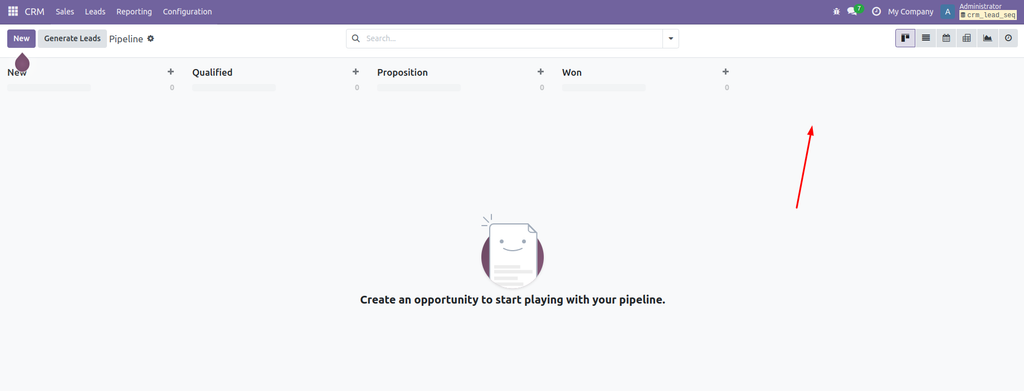
How Does It Work?
The group_create="false" attribute disables the ability to create new stages directly from the Kanban view.
Key Takeaway
In Odoo 18, adding group_create="false" to the Kanban view’s root tag is a simple way to hide the “Add a stage” option and maintain better control over your workflow configuration.